The operating system for hospitality
Run the whole housefrom one screen.
Billing, tables, kitchen tickets, rooms, delivery, stock, staff and a real profit and loss, on the phones and laptops you already own. Your guests order straight from the table on Vibers Connect.
- workspaces, one login
- 15
- commission on your sales
- 0%
- setup, once
- ₹599
Real product screens · sample café and data
- Table T-04 · 2 Cappuccino, 1 Seafood Paella sent to the kitchen
- KOT #141 ready · Grill station · 6 min
- Vibey · “something to share” → Seafood Paella added
- Room 204 · late check-out requested
- Delivery DLV-7F3A · out for delivery · 2.4 km
- Bill settled · ₹1,008 · UPI · 7% to the guest’s wallet
- Milk below reorder level · 6 L on the purchase list
The film · 1 min 49
Watch the whole house run in under two minutes.
No slides, no mock-ups. A real menu in Manali, a kitchen board, a guest's phone and the till, recorded as they ran.
- 01
A guest scans the table QR
and orders from a menu with photos, moods and the house specials.
- 02
The kitchen board lights up
and the guest watches their plate move from received to ready.
- 03
The bill settles at the till
with the invoice, the wallet, and ₹3 to us. Nothing else.
Real product screens · guest menu filmed live at The Mad Kings, Manali · host screens on a sample café
How it flows
One order. Both sides, live.
Follow a table from the QR scan to the day's report. The guest's steps happen in Vibers Connect, the venue's in Quad Computing, in the same second.
Guest · Vibers Connect
Venue · Quad Computing
Live tables · Ground floor
- T-01Vacant
- T-02Ordering
- T-03Vacant
- T-04Aanya · just in
- T-05Vacant
- T-06Vacant
- T-07Ordering
- T-08Vacant
T-04 scanned the QR · menu open on the guest’s phone
Scan the table QR
GuestThe venue’s menu opens in the phone’s browser. Nothing to install.
VenueLive Tables shows the table taken, with the guest’s name.
Real product screens · sample café and data
Your turn
Run a table yourself.
Order as the guest, then cook and settle as the venue. Thirty seconds, and you will know how a Saturday feels on Quad Computing.
GuestYou are the guest at the table. Tap + on a dish or two, then send it to the kitchen.
The guest’s phone
Table T-04
The Juniper Table
Slow coffee, all-day plates

Cappuccino

Grilled Skewers
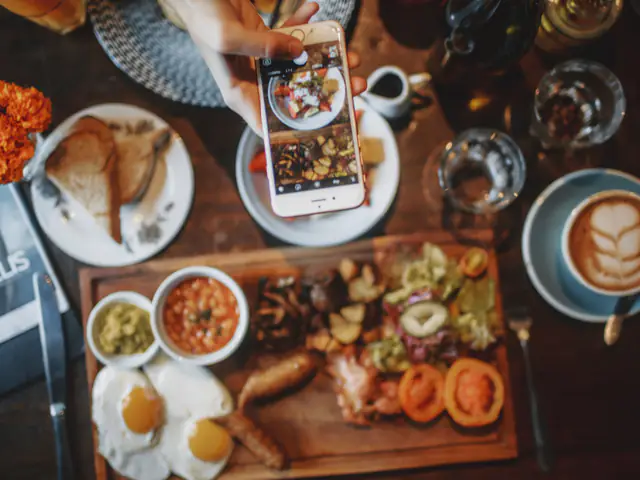
Breakfast Board
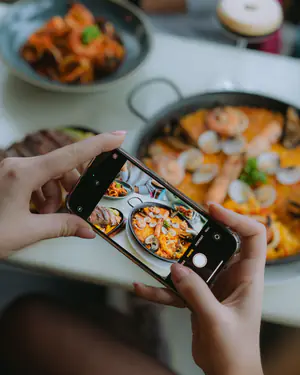
Seafood Paella
Your control centre
Sales today
₹0
Bills settled
0
7% to guests
₹0
Fees at ₹3
₹0
New
Waiting for T-04 to send an order…
Preparing
Ready
Counter: nothing to settle yet
Grow your sales
Fill the quiet nights. Sell beyond the menu.
A till records the guests who walk in. Quad Computing brings more of them, and gives each one more to say yes to.
What you see · Quad Computing
What your guest sees
Turn a quiet night into a full one
Publish an event in a minute. It appears on every table’s menu and in the lounge, and you see who is coming before the night.
- 01 · YouPublish the event with seats, fee and perks
- 02 · GuestSees it on the menu and in the lounge
- 03 · GuestTaps “I’m Interested” for their party
- 04 · YouConfirm, message on WhatsApp, fill the night
Included with ₹3 a bill
Real product screens · sample café and data
The control centre
Every answer an owner needs, on one screen.
Real Quad Computing screens with a sample café's data. Every number on them comes from the same maths your venue's numbers will.
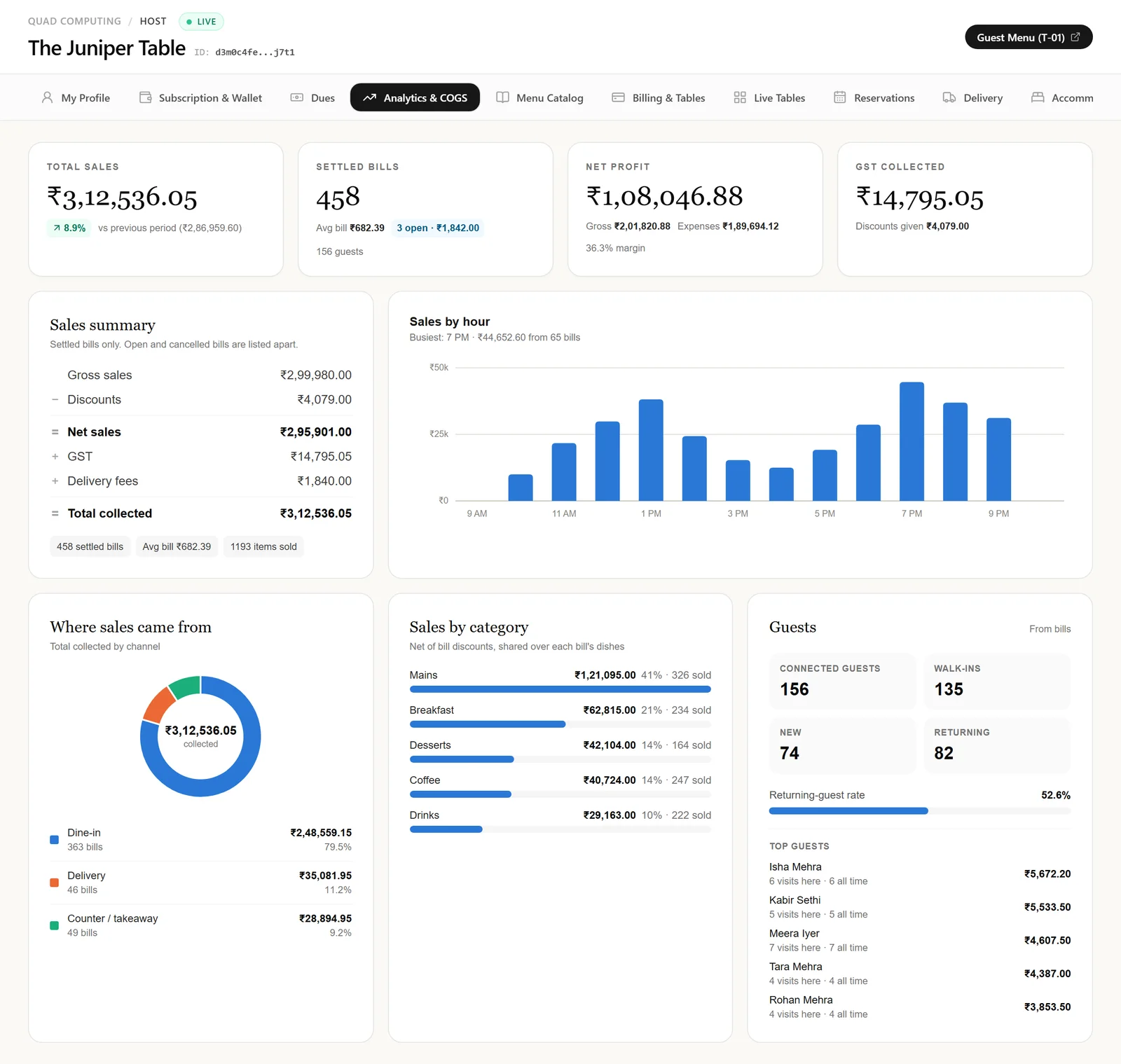
Analytics and reports
Today, yesterday, 7 or 30 days, this month, 12 months or any custom range. Every figure comes from settled bills, in India time.
- Total sales against the period before, settled bills, average bill and open bills
- Sales summary: gross, discounts, net, GST, delivery fees and total collected
- Sales by hour with the busiest hour named, and by weekday
- Where sales came from (dine-in, delivery, counter), sales by category, and connected guests
Real product screens · sample café and data
Quad Computing for hosts
Fifteen workspaces. One login.
Everything a restaurant, café or stay needs for a day of service. Each person sees their part; the owner sees all of it.
15 workspaces shown
My Profile
Venue details, hours, delivery and booking terms, and a PIN lock for shared screens.
Subscription & Wallet
₹3 a bill from prepaid credit, with a clear statement.
Dues
You earn against we earn, daily 10 AM to 10 PM slips, every invoice a tap away.
Analytics & COGS
A-to-Z reports for any range and a full profit and loss with every expense.
Menu Catalog
Categories, add-ons, dish photos and recipes linked to raw stock.
Billing & Tables
Counter and table billing with GST-ready receipts, cash, UPI or card.
Live Tables
Every table’s guests, orders and bill requests; free a table in one tap.
Reservations
Table bookings from the guest menu: confirm, seat or cancel from one list.
Delivery
Orders inside your radius, COD or UPI in advance, tracked to the door.
Accommodations
Front desk, check-in, room services and check-out in one place.
Live Kitchen (KOT)
Tickets route to stations and move from new to preparing to ready.
Raw Inventory
Stock with reorder levels, wastage and counts, deducted by recipes.
Staff & Expenses
Team, salaries, advances and daily bills, all inside the P&L.
My Guests
Every connected guest: visits, spend and who keeps coming back.
Vendors
Partners’ QR and WhatsApp, with guest orders shared in one tap.
Vibers Connect, for your guests
Your guests get Vibers Connect.
Guests never see the Quad Computing name, only your venue, your menu and the people sharing the room tonight.
- Nothing to install
- Table service, chef or bill in one tap
- 7% wallet cashback
- Reviews and the photo vault
Real product screens · sample café and data
The numbers
Your business, with us and without.
Four numbers decide a venue's year. Here is how partnership moves each one, drawn for an example café.
Footfall
Events and the lounge fill quiet nights
New customers
Vibers find you through the circle
Conversion
QR ordering and Vibey at every table
Retention
7% back brings each guest again
Footfall, month by month
Guests a month at an example café, over its first six months.
- Without us
- With Vibers Connect
Guests who come back
Share returning within 60 days, months 1 to 12.
- Without us
- With Vibers Connect
Where a ₹600 bill goes
No commission on your sales: one flat fee per settled bill, whatever its size.
- You keep₹597
- Our fee₹3
Who walks in
Where an example month's guests come from, once you are part of the circle.
- Regulars50%
- Walk-ins28%
- Vibers community22%
Slides 01, 02 and 04: illustrative example, not measured results. They show the direction partnership is built to move, not a promise of figures; every venue's numbers are its own.
Pricing
You earn. We earn ₹3 a bill.
One way to pay, and it only moves when you sell: a flat fee for each settled bill, never a cut of your sales. Every feature, from the first day.
- ₹3 per settled bill, whatever its size
- No bills, no charge: no monthly or yearly fee
- Every feature: rooms, events, delivery, offers
- Viber Connect, Viber Club and Vibey AI
- Paid from your credit wallet, no expiry
You earn
₹597
99.5% of every bill
We earn
₹3
0.50%, flat on any size
Over 100 bills: you earn ₹59,700, we earn ₹300. No bills, no charge; no monthly or yearly fee.
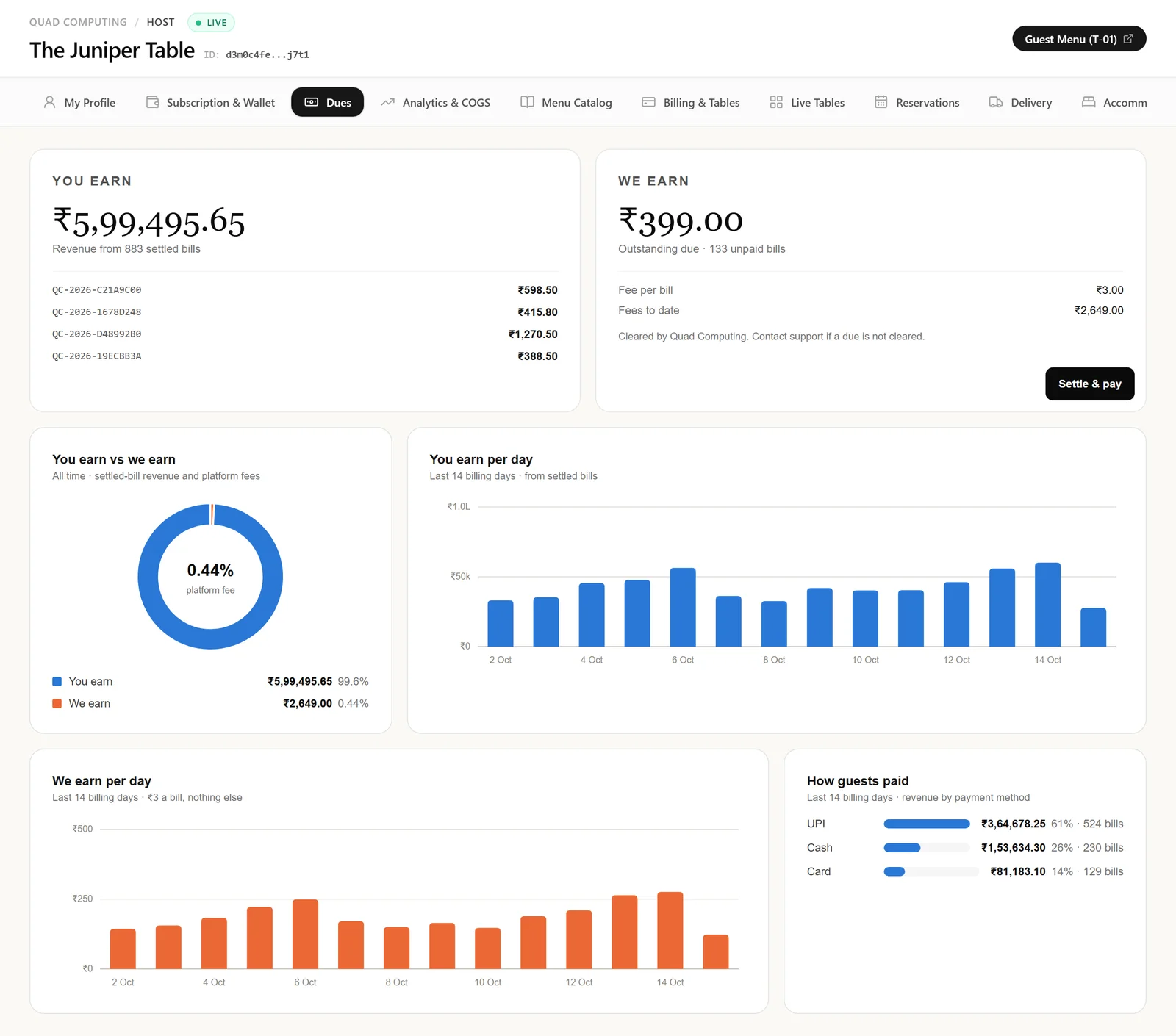
Real product screens · sample café and data
Every rupee, in the open.
Dues shows what you earned beside what we earned, a slip for every billing day and every invoice a tap away. No surprises at the end of the month.
0.5%
₹3 on a ₹600 bill. No commission on your sales, ever.
₹0
on a day with no bills. No monthly or yearly fee.
Every
feature: rooms, events, delivery, offers, Vibey AI and Viber Club.
₹599
once: your profile, menu entered for you, design and table QR codes.
Compare
A till was never enough. This is the whole house.
How Quad Computing with Vibers Connect differs from a typical counter-billing POS. Setups vary from vendor to vendor; the pattern rarely does.
How you pay
Quad Computing: ₹3 a settled bill, and nothing else. No per-device licences.
Typical legacy POS: A licence per billing terminal, renewed every year; another counter, another licence.
Devices
Quad Computing: Any phone, tablet or laptop you already own, in the browser.
Typical legacy POS: Usually a dedicated billing PC or terminal, often bought with the software.
Guest ordering
Quad Computing: Table and room QR menu; the order reaches the kitchen with no one in between.
Typical legacy POS: Often a paid add-on, or no guest ordering at all.
Delivery
Quad Computing: Your own delivery from your own menu, inside your radius, with no commission.
Typical legacy POS: Mostly through aggregator apps, with their commission on every order.
Kitchen
Quad Computing: Live tickets by station on any screen, timed from new to ready.
Typical legacy POS: Printed KOTs; kitchen screens often cost extra.
Rooms and stays
Quad Computing: Front desk, check-in, room service and the room bill in the same login.
Typical legacy POS: A separate hotel system, with its own login and its own bill.
“Typical legacy POS” describes common counter-billing setups in Indian restaurants, not any one product; features and prices vary by vendor. Quad Computing features as of October 2026.